Wee Wonderer
October 2026
A cozy browser toy where a tiny figurine walks, runs, jumps and climbs around a Gaussian-splat scan of a real room.
It’s been a while since I’ve worked on a personal project end to end… but with how fast frontier models have been improving, I realized there was really nothing stopping me from building something of my own. Recently, it gave me the push I needed to continue pursuing my own education in Gaussian splats.
The Idea
As a kid, I used to imagine being the size of a thumbtack and seeing the world from that perspective. Not necessarily a unique thought I know… but think about it - climbing up the side of your desk, sledding down your laptop stand on an eraser, or swinging off your houseplant’s leaves to trampoline off your couch cushions!
Gaussian splats make it possible to bring any real environment to life digitally, and with models like Opus 5.5, it’s actually possible to build a version of this as an individual!
The Tech Stack
I knew I wanted this to be a browser experience, so three.js was a natural pick. It also had all the pieces I needed built in: native Gaussian splat support, cameras, lighting and animation. Best of all, three.js draws splats and regular 3D models into the same depth buffer, so the figurine hides behind a chair and the chair hides behind him, without me having to worry about occlusion. It’s also a library LLMs know very well, so the decision was easy.
Dynamically Generated Collision Meshes
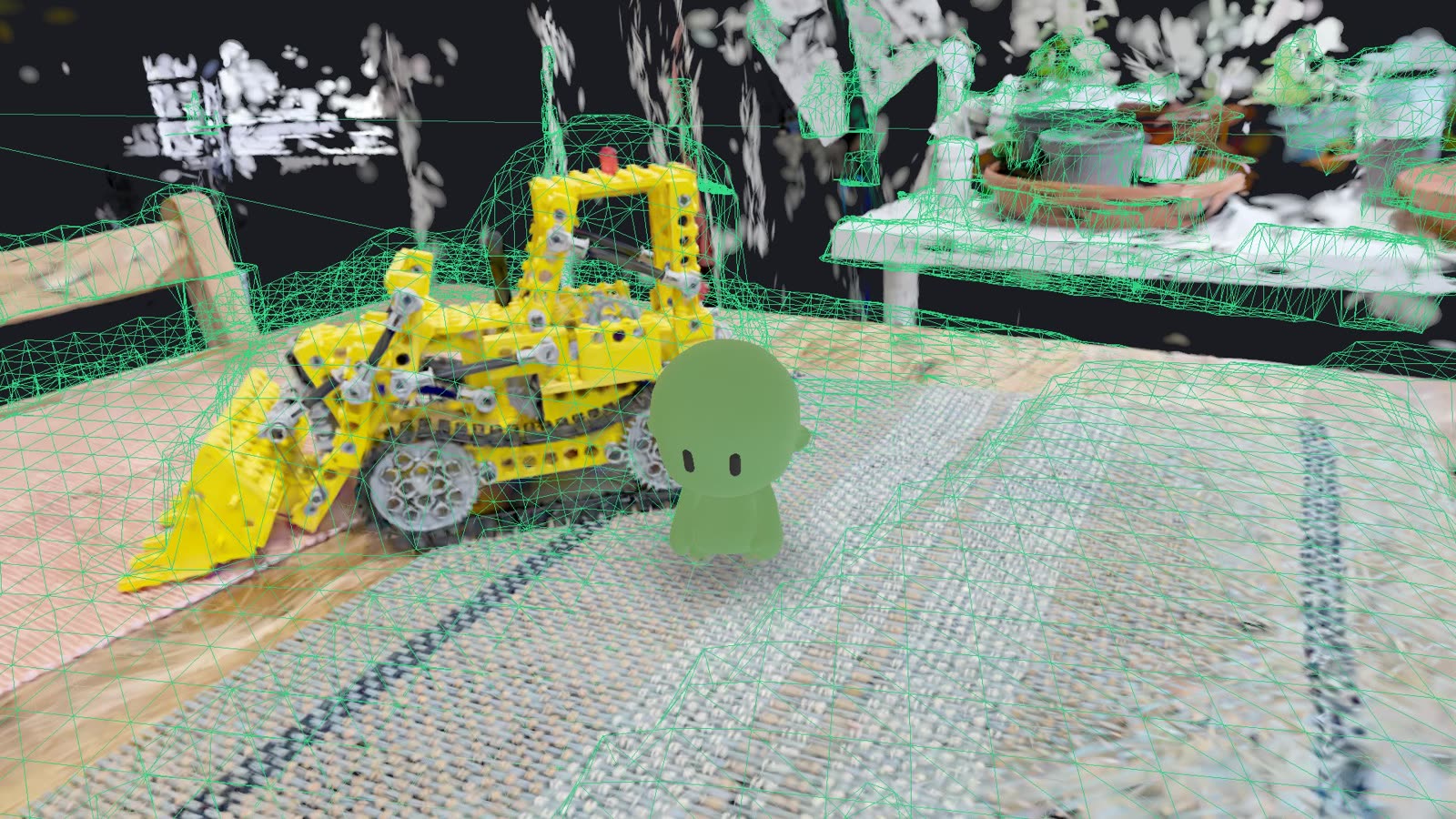
The most obvious problem to solve in a project like this is generating a collision mesh for a splat scan on the fly. A splat scan is made of over a hundred thousand ellipse-shaped splats, each with its own color, shape and opacity, that together represent a 3D environment. There are no meshes, no physics and no collision system: none of the baseline things a game needs.
Density Grid
I used the isosurface method: find the surface where density crosses a specific threshold.
The scan is divided into a grid of voxels, and each voxel holds a running total of opacity, its “density”. For every splat, I calculate how much of its opacity lands in each voxel it covers, based on its shape. That way, large faint splats (often floaters) spread their little bit of opacity over many voxels, while small solid splats on real surfaces concentrate theirs in a few.
With the density grid in place, a threshold decides which voxels are solid. In my implementation, that threshold is 35% of the median density of the voxels, so it adapts to each scan instead of being one fixed number.
Voxel Cleanup
Not every scan is perfect. Common issues include stray blobs floating in the air and holes in real surfaces. Wee Wonderer runs several cleanup passes on the voxels:
- removing small isolated clumps
- closing small holes
- filling gaps in the floor
- filling holes in flat vertical surfaces like cabinet doors
Mesh Generation
I use Surface Nets to build the mesh from the voxel grid. Surface Nets places one vertex inside each voxel cell the surface passes through, where the density crosses the threshold along the cell’s edges, and joins neighboring vertices into faces. The result is a smooth mesh that follows the splats much more closely than the voxels’ blocky faces would. I then run a Taubin smoothing pass (a kind of smoothing that doesn’t shrink the mesh) so no trace of the blocky voxel shape remains.
Bounding Volume Hierarchy (BVH) Lookup
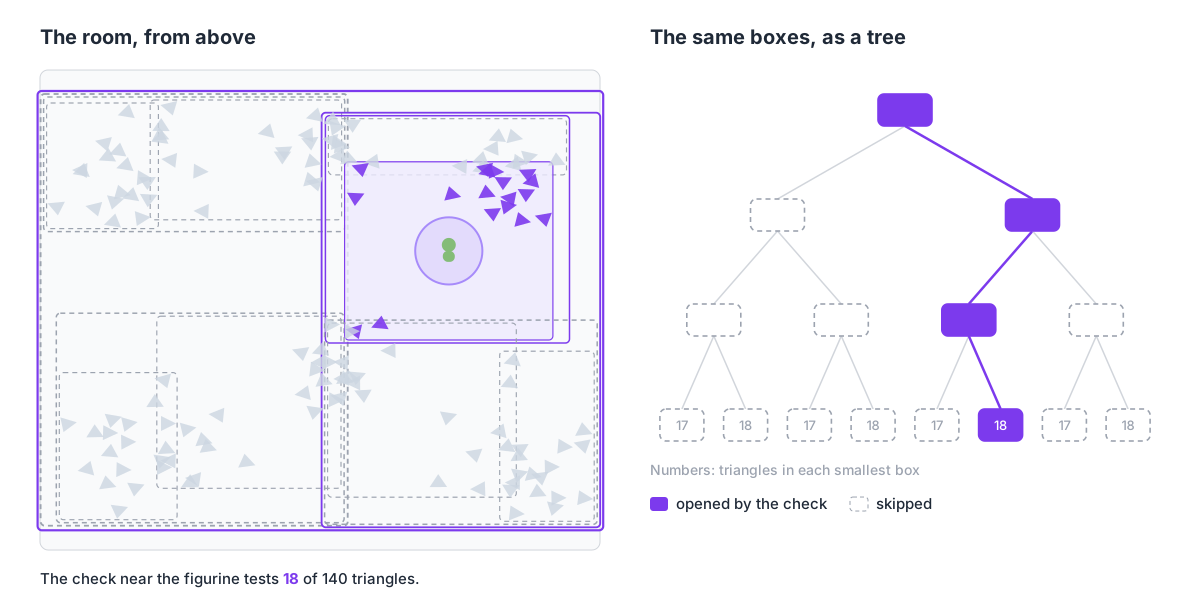
Every frame, the game checks the collision mesh to see whether the figurine is bumping into something, whether there’s a wall ahead to climb, where the ground is, and so on. The mesh has tens of thousands of triangles, sometimes over a hundred thousand, so checking every one of them each time would be far too slow. Instead, I use three-mesh-bvh to build a bounding volume hierarchy (BVH) for each room. A BVH is a tree of boxes: each box holds two smaller boxes, all the way down to small boxes of about ten triangles each. A check starts at the biggest box and only goes into the boxes it actually touches, so it skips most of the room and only tests the few triangles near the figurine.
I also use the BVH when a room loads to build a map of walkable areas, by casting rays straight down to find every floor, tabletop and shelf with enough room above it to stand.
Future Plans
So far I’ve built the foundational pieces of Wee Wonderer, but there’s a lot more I want to do. Here are just a few:
- Smoother collision meshes for smoother travel, possibly with an LLM-driven step that tunes the collision settings for each scan
- More game mechanics: collectibles, enemies, items and other fun little things hidden in the scans
- More avatars, possibly with their own custom movements and actions
How I Worked with AI on This Project
I’ve been working with Claude Code and Codex for almost all of 2026 as part of my work at Meta, and over that time I’ve developed my own style of working with agents. Almost every line of Wee Wonderer was written by an agent, but I stay in charge of the decision making throughout the entire process.
Staying in Charge
I lean towards micromanaging my agents, especially on a project like this, where I want to understand exactly how things are implemented and why. That takes attention, so I work with one agent at a time. I used to run an army of agents on four things at once, but I’d confuse myself context switching and couldn’t make decisions well. There’s still a time and place for that kind of multitasking, just not for work I want to understand deeply.
Plan First, Spike When Unsure
Most of that attention goes into planning. Before anything gets built, my agent and I agree on a plan: the steps, and how we’ll test the result. The agent knows to ask for my OK before changing anything, which keeps it from going rogue. When planning can’t settle a choice, I run a quick spike to see which approach actually works. With AI, experiments are cheap. I ran about fifteen on this project and threw several away, including a Spider-Man-style wall crawl. Each new feature also gets a fresh session, so everything worth remembering lives in the repo for the next one to read.
Letting the Agent Check Its Own Work
I don’t want to play through the game every time the agent tries a fix, so I gave it a testing environment it can run itself. That matters most for finding real fixes: an AI will happily hide a symptom if you let it, so I ask for the root cause of every fix, measured, not guessed. When the figurine could sink into an overhang while climbing, the agent added temporary logging, reproduced the bug, and traced it to a single snap toward the wall that could push the body almost three body-widths forward in one frame. Only then did we fix it.
Credits
- Kitchen, Living Room and Counter scans: the Mip-NeRF 360 dataset (Jonathan T. Barron, Ben Mildenhall, Dor Verbin, Pratul P. Srinivasan, Peter Hedman, CVPR 2022), CC BY 4.0. Trained into splats by alexmkwizu; cleaned, levelled and converted for this project.
- The figurine: Free Pack – Chibi Base Mesh (Rigged) by PolyOne Studio, CC BY 4.0, with animations from Mixamo.